Configuration
The Data Relay block allows you to easily send or receive data with a cloud service like a message queue. This page describes how to configure it.
Autoconfiguration
Each cloud service requires the value of certain configuration and authentication variables to function. For example, suppose you have set up Azure Event Hubs in the Microsoft cloud. In this case you must define a connection string (AZURE_EH_CONNECTIONSTRING), a storage account (AZURE_EH_STORAGE_ACCOUNT), and so on to communicate with Event Hubs. However, you do not need to explicitly activate Event Hubs as a whole on the balena device. Simply defining all the required balena application variables is sufficient to activate use of the service on the device.
This autoconfiguration capability also means you may send data to multiple cloud services or cloud providers for each message received on the MQTT input queue on a device. As long as the required environment variables for a cloud service are defined, the Data Relay block will attempt to use it.
Send vs. Receive Data
Balena devices commonly are used to send data to the cloud. However, some devices need to receive data from external sources. The Data Relay block makes it easy to receive data when a cloud data source provides it simply by defining an application variable, as shown in the diagram below.
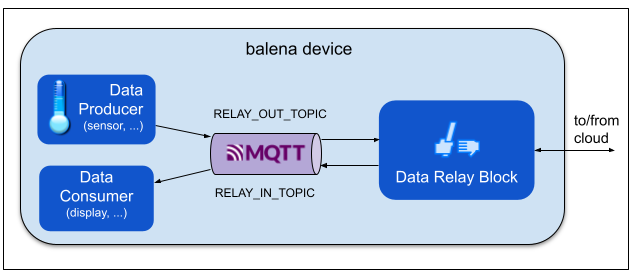
For example, a cloud message queue like Azure Event Hubs can forward messages added to it. If you define a topic name for RELAY_IN_TOPIC, then the Data Relay block automatically subscribes to messages from Event Hubs, and publishes the data on the device with that MQTT topic. See the remote-reader example.
Configuration via Secret Store
AWS includes a secret store service, Secrets Manager. Like it sounds, a secret store is used to store and access secret values, accessed by name like an environment variable. In fact, the services we wish to configure are housed with the cloud provider. So actually it is safer and more convenient to store the service configuration values as secrets with the provider in the cloud rather than specify them separately as application Variables in balenaCloud.
In addition a security best practice is to periodically rotate secret values just in case a value has been compromised without your knowledge. Rotation is easier to implement when the the secret values are defined with the cloud service provider.
The diagram below shows the steps to setup and run the Data Relay block. The Data Relay block includes a Configurator that initially reads both application variables and secret values from a secret store. Next the configurator connects to the cloud data service with the required service and authentication values. Then the block is ready to push your application data to the cloud service.
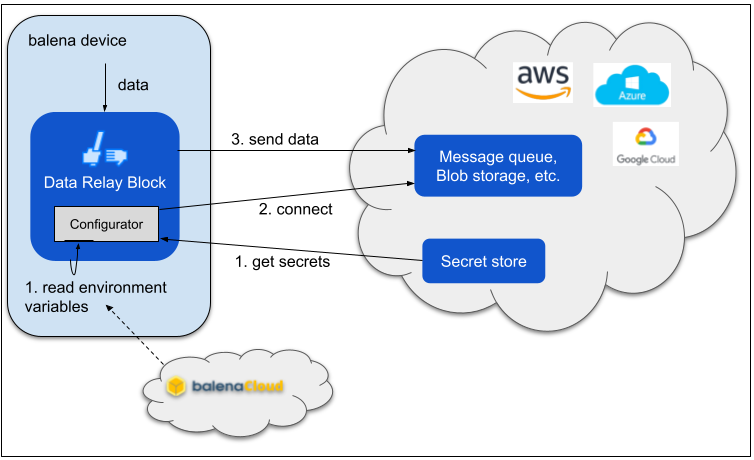
A secret store itself also requires some setup and authentication values to allow access to its secrets. These values must be provided as balena application Variables.
AWS Secrets Manager setup
| Variable | Notes |
|---|---|
| AWS_SECRETSMGR_REGION | AWS region in which the secret store is defined |
| AWS_SECRETSMGR_ACCESS_KEY | IAM access key ID |
| AWS_SECRETSMGR_SECRET_KEY | IAM secret key for access key |
See the AWS Secrets Manager User Guide for help with setup. See the IAM User Guide for general help with users and security.
When actually adding secrets, add them simply as Plaintext -- no separate key and value. AWS Secrets Manager console defaults to a "compound" secret that contains a list of key:value pairs rather than just a single plaintext value.
Azure Key Vault setup
| Variable | Notes |
|---|---|
| AZURE_VAULT_NAME | Key vault name |
| AZURE_VAULT_TENANT_ID | |
| AZURE_VAULT_CLIENT_ID |
It is straightforward to set up Azure Key Vault from the Azure CLI. See the CLI installation instructions. Dapr provides useful setup instructions for Key Vault.
You also must add the certificate file to the data_relay container by building a custom container. See the cputemp example Docker Compose file and data_relay directory for an example.
GCP Secret Manager setup
| Variable | Notes |
|---|---|
| GCP_SECRETMGR_TYPE | likely service_account |
| GCP_SECRETMGR_PROJECT_ID | |
| GCP_SECRETMGR_CLIENT_EMAIL | |
| GCP_SECRETMGR_PRIVATE_KEY | Actual key for the account, like '-----BEGIN PRIVATE KEY-----\nMII...Gy1\n-----END PRIVATE KEY-----\n' |
The variable values are provided in a JSON file when creating a service account in the GCP console.

